

Caring for houseplants
Using the following image file (download this file):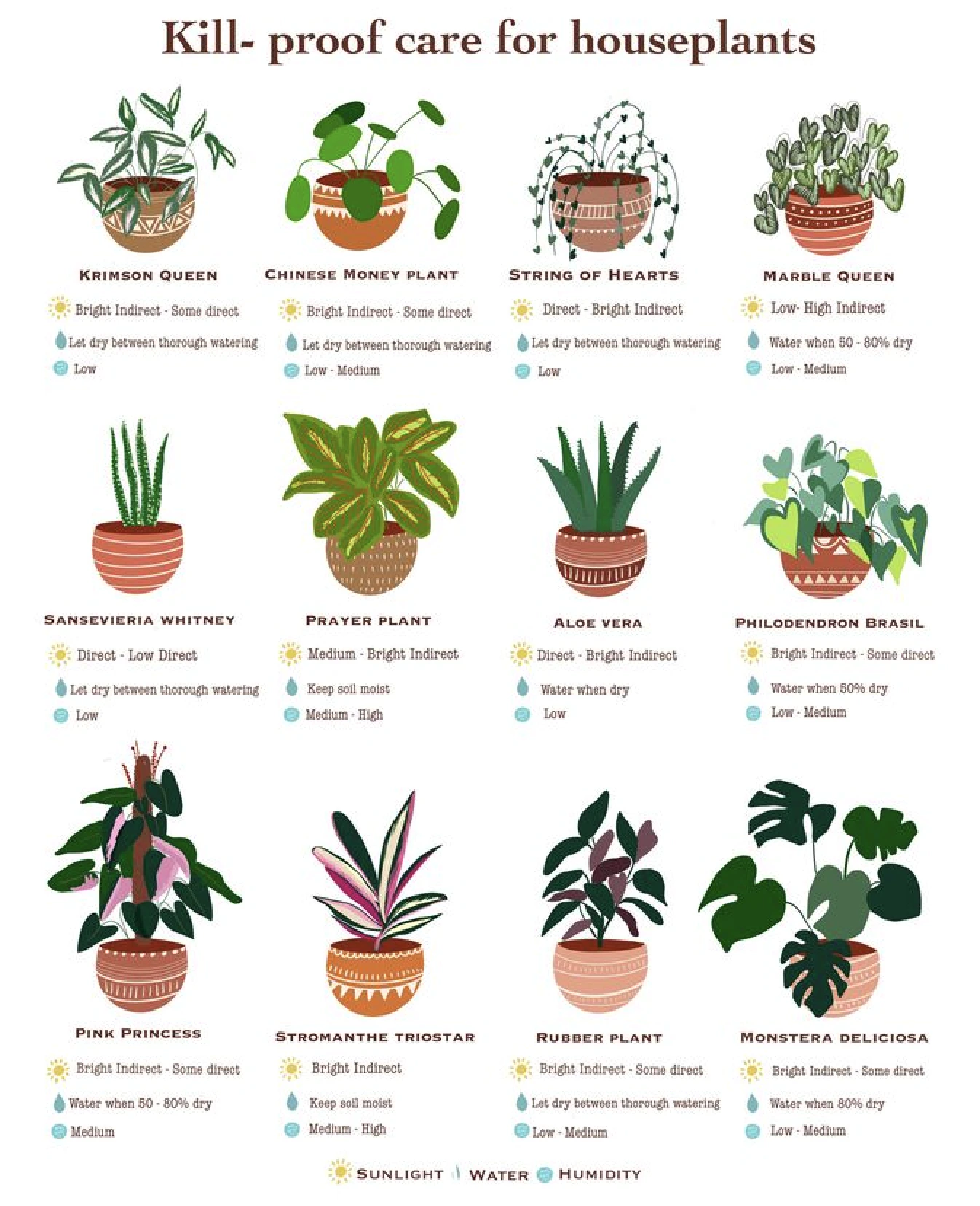
{
  "type": "object",
  "properties": {
    "plants": {
      "type": "array",
      "items": {
        "type": "object",
        "properties": {
          "name": {
            "type": "string",
            "description": "The name of the plant"
          },
          "sunlight": {
            "type": "string",
            "description": "The sunlight requirements for the plant (for example: 'Direct', 'Bright Indirect - Some direct')."
          },
          "water": {
            "type": "string",
            "description": "The watering instructions for the plant (for example: 'Let dry between thorough watering', 'Water when 50-60% dry')."
          },
          "humidity": {
            "type": "string",
            "description": "The humidity requirements for the plant (for example:'Low', 'Medium', 'High')"
          }
        },
        "required": ["name", "sunlight", "water", "humidity"],
        "additionalProperties": false
      }
    }
  },
  "required": ["plants"],
  "additionalProperties": false
}
The schema prompt is available only from the Start page.
The workflow designer does not offer a schema prompt —you must provide an
extraction schema instead.
Extract the plant information for each of the plants in this document, and present it in the following format:

- plants: A list of plants.

  - name: The name of the plant.
  - sunlight: The sunlight requirements for the plant (for example: 'Direct', 'Bright Indirect - Some direct').
  - water: The watering instructions for the plant (for example: 'Let dry between thorough watering', 'Water when 50-60% dry').
  - humidity: The humidity requirements for the plant (for example: 'Low', 'Medium', 'High').
[
  {
    "type": "DocumentData",
    "element_id": "3be179f1-e1e5-4dde-a66b-9c370b6d23e8",
    "text": "",
    "metadata": {
      "...": "...",
      "extracted_data": {
        "plants": [
          {
            "name": "Krimson Queen",
            "sunlight": "Bright Indirect - Some direct",
            "water": "Let dry between thorough watering",
            "humidity": "Low"
          },
          {
            "name": "Chinese Money Plant",
            "sunlight": "Bright Indirect - Some direct",
            "water": "Let dry between thorough watering",
            "humidity": "Low - Medium"
          },
          {
            "name": "String of Hearts",
            "sunlight": "Direct - Bright Indirect",
            "water": "Let dry between thorough watering",
            "humidity": "Low"
          },
          {
            "name": "Marble Queen",
            "sunlight": "Low- High Indirect",
            "water": "Water when 50 - 80% dry",
            "humidity": "Low - Medium"
          },
          {
            "name": "Sansevieria Whitney",
            "sunlight": "Direct - Low Direct",
            "water": "Let dry between thorough watering",
            "humidity": "Low"
          },
          {
            "name": "Prayer Plant",
            "sunlight": "Medium - Bright Indirect",
            "water": "Keep soil moist",
            "humidity": "Medium - High"
          },
          {
            "name": "Aloe Vera",
            "sunlight": "Direct - Bright Indirect",
            "water": "Water when dry",
            "humidity": "Low"
          },
          {
            "name": "Philodendron Brasil",
            "sunlight": "Bright Indirect - Some direct",
            "water": "Water when 80% dry",
            "humidity": "Low - Medium"
          },
          {
            "name": "Pink Princess",
            "sunlight": "Bright Indirect - Some direct",
            "water": "Water when 50 - 80% dry",
            "humidity": "Medium"
          },
          {
            "name": "Stromanthe Triostar",
            "sunlight": "Bright Indirect",
            "water": "Keep soil moist",
            "humidity": "Medium - High"
          },
          {
            "name": "Rubber Plant",
            "sunlight": "Bright Indirect - Some direct",
            "water": "Let dry between thorough watering",
            "humidity": "Low - Medium"
          },
          {
            "name": "Monstera Deliciosa",
            "sunlight": "Bright Indirect - Some direct",
            "water": "Water when 80% dry",
            "humidity": "Low - Medium"
          }
        ]
      }
    }
  },
  {
    "...": "..."
  }
]
Medical invoicing
Using the following PDF file (download this file):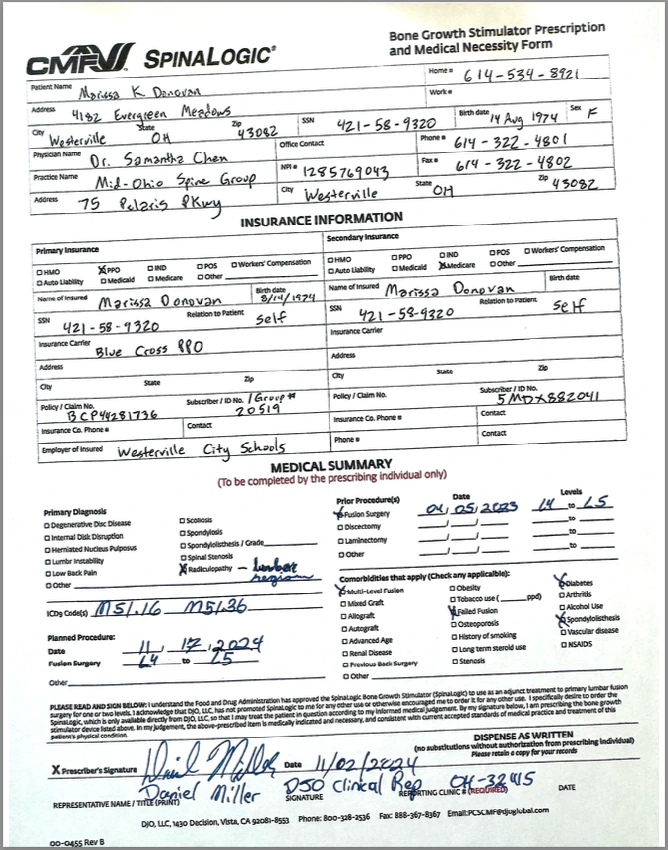
{
  "type": "object",
  "properties": {
    "patient": {
      "type": "object",
      "properties": {
        "name": {
          "type": "string",
          "description": "Full name of the patient."
        },
        "birth_date": {
          "type": "string",
          "description": "Patient's date of birth."
        },
        "sex": {
          "type": "string",
          "enum": ["M", "F", "Other"],
          "description": "Patient's biological sex."
        }
      },
      "required": ["name", "birth_date", "sex"],
      "additionalProperties": false
    },
    "medical_summary": {
      "type": "object",
      "properties": {
        "prior_procedures": {
          "type": "array",
          "items": {
            "type": "object",
            "properties": {
              "procedure": {
                "type": "string",
                "description": "Name or type of the medical procedure."
              },
              "date": {
                "type": "string",
                "description": "Date when the procedure was performed."
              },
              "levels": {
                "type": "string",
                "description": "Anatomical levels or location of the procedure."
              }
            },
            "required": ["procedure", "date", "levels"],
            "additionalProperties": false
          },
          "description": "List of prior medical procedures."
        },
        "diagnoses": {
          "type": "array",
          "items": {
            "type": "string"
          },
          "description": "List of medical diagnoses."
        },
        "comorbidities": {
          "type": "array",
          "items": {
            "type": "string"
          },
          "description": "List of comorbid conditions."
        }
      },
      "required": ["prior_procedures", "diagnoses", "comorbidities"],
      "additionalProperties": false
    }
  },
  "required": ["patient", "medical_summary"],
  "additionalProperties": false
}
The schema prompt is available only from the Start page.
The workflow designer does not offer a schema prompt —you must provide an
extraction schema instead.
Extract the medical information from this record, and present it in the following format:

- patient

  - name: Full name of the patient.
  - birth_date: Patient's date of birth.
  - sex: Patient's biological sex.

- medical_summary

  - prior_procedures

    - procedure: Name or type of the medical procedure.
    - date: Date when the procedure was performed.
    - levels: Anatomical levels or location of the procedure.

  - diagnoses: List of medical diagnoses.
  - comorbidities: List of comorbid conditions.

Additional extraction instructions:

- name: Extract the full legal name as it appears in the document. Use proper capitalization (for example: "Marissa K. Donovan").
- birth_date: Convert to format "MM/DD/YYYY" (for example: "03/28/1976"),

  - Accept variations: MM/DD/YYYY, MM-DD-YYYY, YYYY-MM-DD, Month DD, YYYY,
  - If only age is given, do not infer birth date - mark as null,

- sex: Extract biological sex as single letter: "M" (Male), "F" (Female), or "X" (Other)

  - Map variations: Male/Man → "M", Female/Woman → "F", Others → "X"

- prior_procedures:

  Extract all surgical and major medical procedures, including:

  - procedure: Use standard medical terminology when possible.
  - date: Format as "MM/DD/YYYY". If only year/month available, use "01" for missing day.
  - levels: Include anatomical locations, vertebral levels, or affected areas.

    - For spine procedures: Use format like "L4 to L5" or "L4-L5".
    - Include laterality when specified (left, right, bilateral).

  - diagnoses:

    Extract all current and historical diagnoses:

    - Include both primary and secondary diagnoses.
    - Preserve medical terminology and ICD-10 descriptions if provided.
    - Include location/region specifications (for example: "radiculopathy — lumbar region").
    - Do not include procedure names unless they represent a diagnostic condition.

  - comorbidities

    Extract all coexisting medical conditions that may impact treatment:

    - Include chronic conditions (for example: "diabetes", "hypertension").
    - Include relevant surgical history that affects current state (for example: Failed Fusion, Multi-Level Fusion).
    - Include structural abnormalities (for example: Spondylolisthesis, Stenosis).
    - Do not duplicate items already listed in primary diagnoses.

Data quality rules:

1. Completeness: Only include fields where data is explicitly stated or clearly indicated.
2. No inference: Do not infer or assume information not present in the source.
3. Preserve specificity: Maintain medical terminology and specificity from source.
4. Handle missing data: Return empty arrays [] for sections with no data, never null.
5. Date validation: Ensure all dates are realistic and properly formatted.
6. Deduplication: Avoid listing the same condition in multiple sections.

Common variations to handle:

- Operative reports: Focus on procedure details, dates, and levels.
- H&P (history & physical): Rich source for all sections.
- Progress notes: May contain updates to diagnoses and new procedures.
- Discharge summaries: Comprehensive source for all data points.
- Consultation notes: Often contain detailed comorbidity lists.
- Spinal levels: C1-C7 (Cervical), T1-T12 (Thoracic), L1-L5 (Lumbar), S1-S5 (Sacral).
- Use "fusion surgery" not "fusion" alone when referring to procedures.
- Preserve specificity: "Type 2 Diabetes" not just "Diabetes" when specified.
- **Multiple procedures same date**: List as separate objects in the array.
- Revised procedures: Include both original and revision as separate entries.
- Bilateral procedures: Note as single procedure with "bilateral" in levels.
- Uncertain dates: If date is approximate (for example, "Spring 2023"), use "01/04/2023" for Spring, "01/07/2023" for Summer, and so on.
- Name variations: Use the most complete version found in the document.
- **Conflicting information**: Use the most recent or most authoritative source.

Output validation:

Before returning the extraction:

1. Verify all required fields are present.
2. Check date formats are consistent.
3. Ensure no duplicate entries within arrays.
4. Confirm sex field contains only "M", "F", or "Other".
5. Validate that procedures have all three required fields.
6. Ensure diagnoses and comorbidities are non-overlapping.
[
  {
    "type": "DocumentData",
    "element_id": "e8f09cb1-1439-4e89-af18-b6285aef5d37",
    "text": "",
    "metadata": {
      "...": "...",
      "extracted_data": {
        "patient": {
          "name": "Ms. Daovan",
          "birth_date": "01/01/1974",
          "sex": "F"
        },
        "medical_summary": {
          "prior_procedures": [],
          "diagnoses": [
            "Radiculopathy — lumbar region"
          ],
          "comorbidities": [
            "Diabetes",
            "Multi-Level Fusion",
            "Failed Fusion",
            "Spondylolisthesis"
          ]
        }
      }
    }
  },
  {
    "...": "..."
  }
]